
 Google
GenType is a playful Google Labs experiment that builds an entire custom alphabet out of anything you can describe. Type a phrase like "grape jelly on toast, aerial shot" or "neon tubes in a dark room," and GenType generates all 26 letters of the alphabet rendered in that exact material and style. It is one of those Google Labs toys that is equal parts delightful and genuinely useful, a way to conjure a one-of-a-kind themed typeface from a single sentence, no design software required.
The cleverness is in the constraint. Instead of generating a single image, GenType takes your one prompt and produces a complete, coherent letterform set, A through Z, all sharing the same look. That makes the output immediately usable for titles, posters, cover art, social graphics, and any project that wants a distinctive, custom lettering style you could never find in a standard font library.
This guide covers everything that matters about GenType in 2026: what it does, how it turns a prompt into a full alphabet, what you can make with it, who it is for, where it now lives, and the limitations of an experimental tool. By the end you will know whether it can add some character to your next project.
What Is GenType?
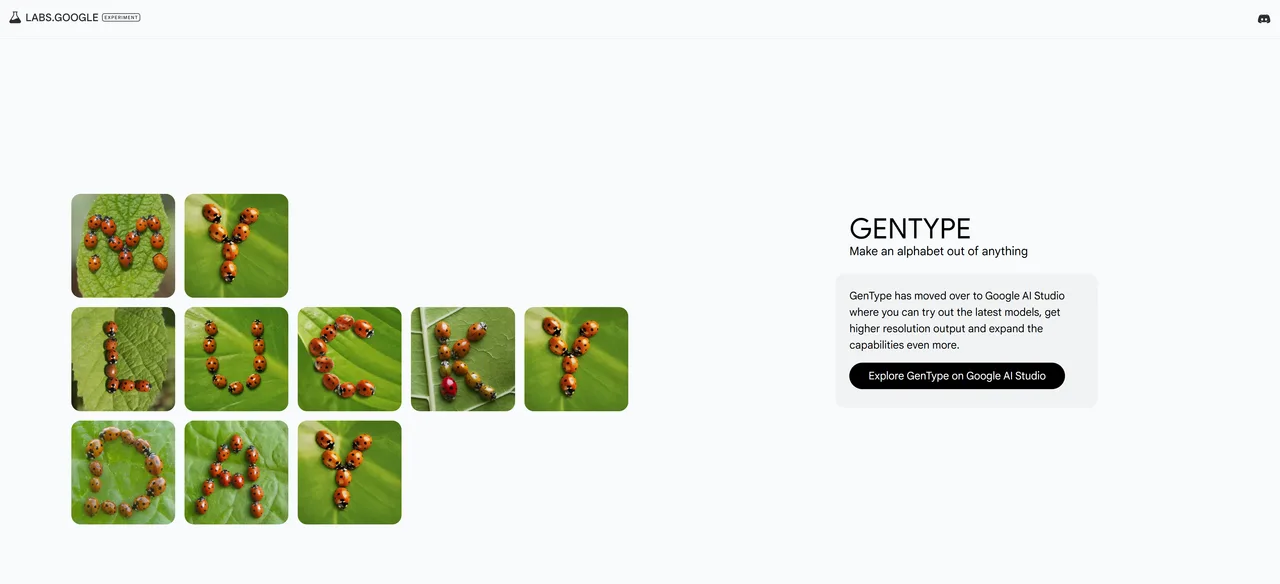
GenType is an AI tool from Google Labs that uses generative AI to create an alphabet out of anything you want. You enter a prompt describing a material, object, or style, and GenType generates all 26 letters of the alphabet in that aesthetic, a complete, themed letterform set built from your single description. Powered by Google's Imagen image model, it turns a written idea into custom typography in moments.
What makes it clever is the automation behind the scenes. From your one input, GenType sends a request for each of the 26 letters, generating them to share a consistent foreground, background, and style. The result is a cohesive alphabet rather than a scattering of unrelated images, with letters that genuinely look like they belong to the same custom typeface.
GenType lives among Google Labs' experiments that push the boundaries of generative AI through unique visual aesthetics and delightful interactions. It has also moved into Google AI Studio, where you can try it with the latest models, get higher-resolution output, and push its capabilities further.
How GenType Works
Creating a custom alphabet with GenType is almost effortless.
- Describe your style. Enter a prompt for the material, object, or aesthetic you want, such as "grape jelly on toast, aerial shot."
- GenType generates 26 letters. It sends a request per letter, building the full alphabet in your described style.
- Review the alphabet. See all the letters rendered consistently as a cohesive typeface.
- Spell out words. Use the generated letters to create custom titles, names, or phrases.
- Refine or export. Adjust the prompt for a different look, or use the higher-resolution output via AI Studio.
The magic is that you direct the look with ordinary words and get back something far more specific than a font picker could offer. Want letters made of moss, chrome, balloons, or stained glass? Describe it, and GenType renders the whole alphabet to match, turning a passing idea into usable, distinctive lettering.
What You Can Make
GenType's custom alphabets suit any project that wants distinctive, themed lettering.
- Title and cover art. Eye-catching headlines for posters, books, albums, and videos.
- Social media graphics. Custom lettering that makes a post stand out.
- Branding experiments. Explore a playful, material-driven look for a name or logo concept.
- Educational and fun visuals. Themed alphabets for classrooms, cards, and creative projects.
- Personalized designs. Spell out names and messages in a one-of-a-kind style.
Who GenType Is For
It appeals to anyone who wants distinctive lettering without typography skills.
Graphic Designers
Designers can quickly explore creative typographic directions and generate custom display lettering for a project, far faster than crafting bespoke letterforms by hand.
Marketers and Content Creators
Marketers can create scroll-stopping titles and themed graphics that match a campaign's concept, adding personality that stock fonts cannot.
Educators and Hobbyists
Teachers, crafters, and anyone who loves experimenting with design can use GenType for fun, themed alphabets, whether for classroom materials, cards, or pure creative play.
Pricing and Availability
GenType is a free Google Labs experiment, with no subscription. It is accessible through Google Labs, and it has also moved into Google AI Studio, where you can use the latest models and get higher-resolution results. As an experimental tool, its exact availability and capabilities may shift over time; check the official Labs or AI Studio page for the current version.
Limitations to Keep in Mind
| Limitation | What to know |
|---|---|
| Display lettering, not a real font | GenType produces images of letters, not an installable, fully functional font file with kerning and all glyphs. |
| A single, focused purpose | It makes themed alphabets, a fun, narrow use case rather than a general design or typography tool. |
| Experimental product | As a Labs experiment, expect evolving capabilities and possible changes to availability over time. |
| Generation quality varies | Some materials and styles render more legibly than others; you may need to tweak the prompt for usable letters. |
| Legibility trade-offs | Highly stylized alphabets can become hard to read, so they suit short titles more than body text. |
Final Verdict
GenType is a small, joyful demonstration of generative AI applied to typography. The idea of describing a material or mood and getting back a complete, coherent alphabet is genuinely delightful, and the output is useful for titles, cover art, and themed graphics that would be impossible to find in any font library. For a free experiment, it punches well above its weight in creative value.
It makes display lettering rather than installable fonts, and its single-purpose, experimental nature means it is more creative tool than design workhorse, but for adding distinctive character to a project, GenType is a treat, now with higher-resolution output via Google AI Studio. Pair it with Mixboard for visual concepting, and browse more free AI tools to round out your creative stack.
Frequently asked questions
What is Google GenType?
GenType is a free Google Labs experiment that uses generative AI to create a complete 26-letter alphabet from a text prompt. You describe a material or style, like "grape jelly on toast," and it generates the whole alphabet in that look, powered by Google's Imagen image model.
Is GenType free?
Yes, GenType is a free Google Labs experiment with no subscription. It is available through Google Labs and has also moved into Google AI Studio, where you can use the latest models and get higher-resolution output.
How does GenType create an alphabet?
From your single prompt, GenType automatically sends a separate request for each of the 26 letters, generating them with a consistent foreground, background, and style so they form a cohesive, themed alphabet rather than unrelated images.
Does GenType make real, installable fonts?
No. GenType produces images of letters in a custom style (display lettering) rather than an installable font file with full glyph sets and kerning. It is ideal for titles and graphics rather than body text.
What can I use GenType for?
Custom title and cover art, social media graphics, branding experiments, educational and fun visuals, and personalized designs, anywhere you want distinctive, themed lettering that a standard font library could not provide.
Where can I use GenType now?
It is accessible through Google Labs, and it has also moved into Google AI Studio, where you can try it with the latest models, get higher-resolution results, and explore expanded capabilities.